Keeping track of mobile SIM cards registered under your identity is an important part of managing your personal information in Pakistan. Many people use multiple SIM cards for personal calls, business, mobile internet, and other purposes. Over time, they may forget about an old connection or stop using a SIM without checking whether it is still registered under their CNIC.
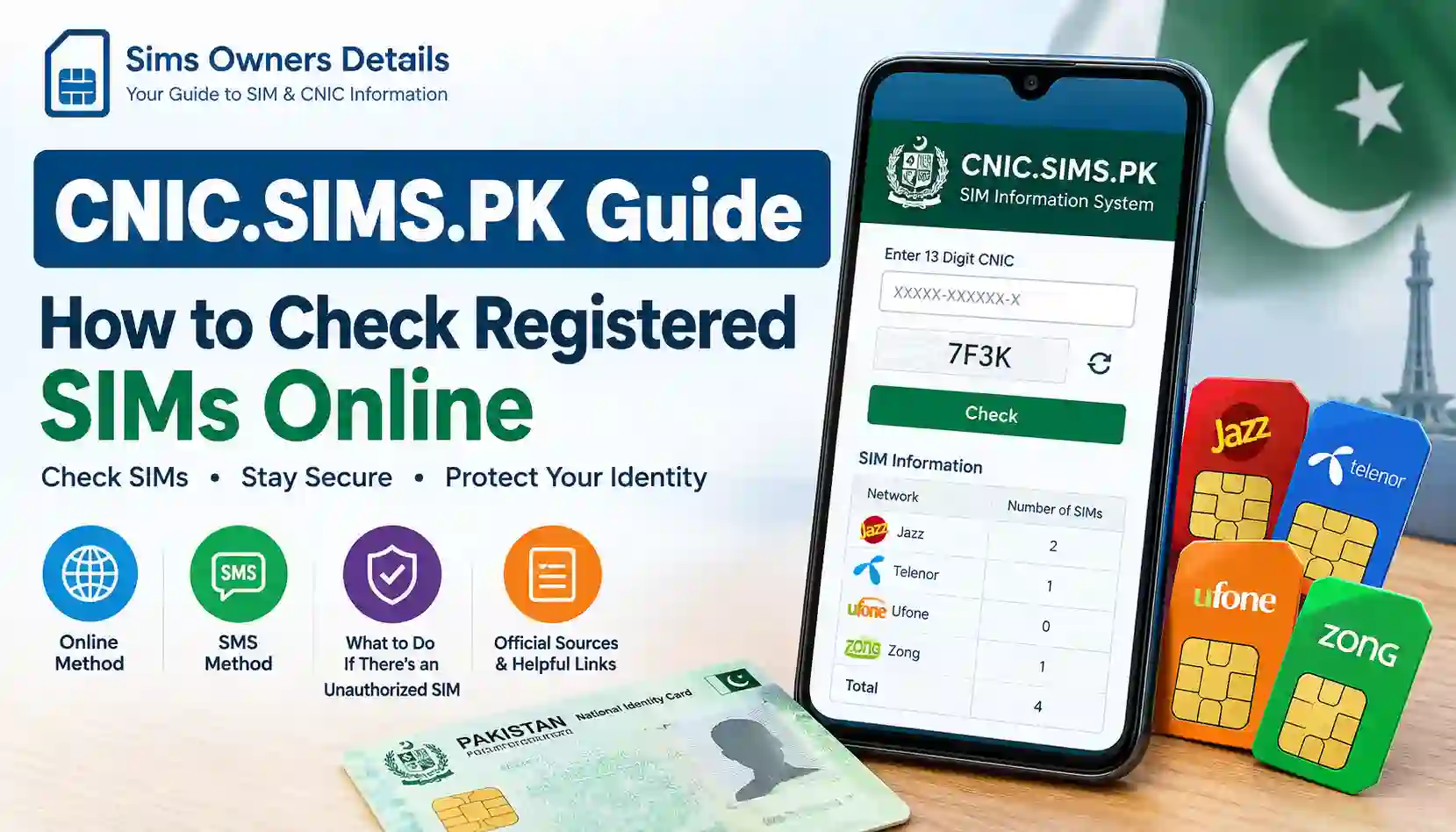
The Pakistan Telecommunication Authority (PTA) provides an online SIM Information System that allows users to check the number of SIM connections registered against their Computerized National Identity Card (CNIC). This service can help you review your SIM registration status and understand how many connections are associated with your identity across different mobile networks.
The official portal is designed to make SIM verification easier without visiting a mobile operator’s office just to check the total number of connections. In this guide, we explain how the SIM information system works, how to check SIMs registered on your CNIC, what information the portal provides, and why regularly reviewing your SIM registration details is a good digital safety practice.
What Is the SIM Information System in Pakistan?
The SIM Information System is an online facility that allows Pakistani citizens to check the number of mobile SIM connections registered against their CNIC. It helps users review their registration information and identify whether the total number of connections associated with their identity is familiar.
The service is particularly useful for people who have used SIM cards from different mobile networks over the years. If you have changed your mobile network, purchased another SIM, or stopped using an older connection, checking your SIM registration count can help you keep track of your mobile connections.
The online system provides an easier way to verify SIM registration counts without manually contacting every mobile network. Users can visit the website, enter their CNIC information, complete the verification process, and view the available results.
Official SIM Information Website:
https://cnic.sims.pk/
The portal is intended for checking SIM connections associated with your own identity. It should not be treated as a public database for searching other people’s personal mobile information.
Why Should You Check SIMs Registered on Your CNIC?
Checking your SIM registration information is useful for several reasons. Your mobile number is often connected to important services, including banking alerts, online accounts, social media, identity verification, and communication with friends and family.
Reviewing the connections associated with your CNIC can help you maintain better control over your mobile identity.
1. Identify Unfamiliar SIM Connections
If the number of SIMs registered against your CNIC is higher than expected, it may be a reason to investigate further. You might have forgotten about an old connection, or there could be a registration issue that needs attention.
Checking your SIM count regularly can help you notice unexpected activity.
2. Keep Your Mobile Connections Organized
Many people purchase SIM cards for different purposes. For example, one connection may be used for business, another for personal calls, and a third for internet access.
If you no longer use a particular connection, reviewing your registration status can help you decide whether you need to keep it active.
3. Protect Your Personal Identity
Mobile SIM registration is connected to identity verification. Keeping track of the connections associated with your CNIC is one way to maintain better control of your personal information.
If you discover an unfamiliar SIM connection, contacting the relevant mobile operator can help you investigate and resolve the issue.
4. Reduce the Risk of Misuse
An unfamiliar SIM connection may create concerns about unauthorized registration or misuse. Although the online portal does not identify individual numbers, it can help you notice an unexpected SIM count and take appropriate steps to verify your records.
How to Check SIM Information Online Using Your CNIC
The official SIM Information System website provides a straightforward process for checking SIM registration information. You can complete the process using a mobile phone, laptop, tablet, or desktop computer with an internet connection.
Follow these steps to check your SIM information online.
Step 1: Open the Official Website
Visit the official SIM Information System portal:
Make sure you are using the correct website address before entering any personal information. Avoid unofficial websites that promise private SIM details or ask for unnecessary personal information.
Step 2: Enter Your CNIC Number
On the website, select the CNIC option and enter your 13-digit CNIC number in the required field.
Enter the number carefully and follow the website’s instructions regarding formatting. If the form requires the CNIC without dashes, enter all digits together.
Step 3: Complete Verification
The portal may require you to complete a verification step to confirm that the request is being submitted by a real user.
Complete the verification shown on the screen before continuing.
Step 4: Submit Your Information
After entering your CNIC and completing the verification, click the Submit button.
The website will process your request and display the available SIM registration information associated with the CNIC you entered.
Step 5: Review the Results
Review the displayed information carefully. The system may show SIM registration counts by mobile network, allowing you to understand how many connections are associated with your CNIC.
If the total number of SIMs is different from what you expected, contact the relevant network operator for further assistance.
How to Check SIMs Registered on Your CNIC Through SMS
If you do not want to use the online portal, you may also check SIM registration counts through the SMS method.
The PTA SIM Information System supports checking SIM counts through the short code 668.
Follow these steps:
- Open the messaging application on your mobile phone.
- Type your 13-digit CNIC number without dashes.
- Send the CNIC number to 668.
- Wait for the response message.
- Review the information provided about SIM connections associated with your CNIC.
SMS charges may apply, depending on the service and current operator rates.
This method can be useful for users who have limited internet access or prefer checking their SIM information directly from their mobile phone.
Which Mobile Networks Can Be Checked?
The SIM Information System helps users review SIM registration counts across mobile networks in Pakistan. Depending on the results displayed, you may see connections associated with mobile operators such as:
- Jazz
- Zong
- Ufone
- Telenor
The purpose of checking these results is to understand how many connections are associated with your identity across different networks.
If you find a connection count that you cannot explain, the next step is to contact the relevant operator and request verification of your registration information.
What Information Does the SIM Information Portal Show?
The online SIM Information System is mainly designed to provide SIM registration counts associated with your CNIC.
It can help you understand:
- The number of SIM connections registered against your CNIC.
- The mobile network associated with the registration count.
- Whether your total SIM connections appear consistent with your own records.
However, the portal is not a public SIM owner database. It does not provide a general search service for obtaining another person’s private information.
What You Cannot Find Through the Portal
The official SIM Information System should not be confused with websites that claim to reveal complete SIM ownership information.
The online portal is not intended to provide:
- Someone else’s CNIC information.
- A person’s home address.
- Private call history.
- Live location information.
- Private subscriber records.
- Personal information about an unknown mobile number.
These details are private, and websites claiming to provide them through an unrestricted search should be treated cautiously.
What to Do If You Find an Unknown SIM on Your CNIC
If the SIM registration count displayed on the website does not match your records, do not ignore the issue. It is better to contact the mobile operator and ask them to verify the connections registered against your identity.
Contact the Relevant Mobile Operator
Identify the network associated with the unexpected SIM count and contact its customer service department or visit an authorized service center.
Explain that you have checked the SIM Information System and want to verify the connections registered against your CNIC.
Request Registration Verification
Ask the operator how you can verify the SIM registrations associated with your identity. They may require identity verification or biometric verification before reviewing the records or processing a request.
Report Unauthorized Registration
If you believe a SIM has been registered without your consent, inform the operator and request assistance with blocking or correcting the unauthorized registration.
You can also use the PTA’s official complaint channels if your issue remains unresolved.
Check Again After Resolution
After the operator has investigated your complaint or updated the registration record, you can revisit the SIM Information System to check whether your registration count has changed.
Tips for Keeping Your SIM Information Secure
Mobile SIM cards are important for communication and account security. A few simple habits can help you protect your mobile identity.
Do Not Share Your CNIC Unnecessarily
Avoid sharing your CNIC information with unknown websites, social media accounts, or individuals who cannot explain why they need it.
Before submitting your identity information online, check the website address and make sure the service is legitimate.
Use SIMs Registered Under Your Own Name
Use mobile connections that are properly registered under your identity according to the applicable verification requirements.
Avoid using SIM cards registered under another person’s identity for long-term personal or business purposes.
Remove Connections You No Longer Need
If you have an unused mobile connection, contact your network operator to ask about closing or blocking it. Keeping only the connections you actually need can make your SIM registration records easier to manage.
Avoid Unofficial SIM Database Websites
Websites that promise names, CNIC details, addresses, or private information through a mobile number may be unreliable and can put your personal information at risk.
Use official services for SIM registration checks instead of uploading or entering your personal information into unknown websites.
SIM Information Check – Frequently Asked Questions
How can I check SIMs registered on my CNIC online?
Visit https://cnic.sims.pk/, enter your CNIC number, complete the verification step, and submit the form. The system will show the available SIM registration count associated with your CNIC.
Is the SIM Information System an official service?
The SIM Information System at cnic.sims.pk is the portal used for checking SIM registration counts associated with a CNIC. PTA also provides the SMS checking method through 668.
Can I check SIM information without internet access?
Yes. You can send your 13-digit CNIC number without dashes to 668 through SMS. Charges may apply.
Can I find the owner’s name using a mobile number?
The SIM Information System does not provide a public lookup service for revealing the personal identity of someone behind an unknown mobile number. It is intended for checking SIM registration counts against your own CNIC.
Does the SIM Information System show complete mobile numbers?
The service is designed to show registration counts, not provide a public list of private mobile numbers or subscriber records.
What should I do if I find an unfamiliar SIM registered on my CNIC?
Contact the relevant mobile operator through its official customer service channel or authorized service center. Ask them to verify the registration and explain how to report or block a connection you do not recognize.
Is the online SIM check available on mobile phones?
Yes. You can open the official website using a mobile browser or a computer browser. The service can be accessed without installing a separate application.
Final Words
The SIM Information System is a useful way to review mobile SIM registration counts associated with your CNIC in Pakistan. By checking your records occasionally, you can keep track of your mobile connections, identify unexpected registration counts, and take action when something does not look right.
Whether you use the online portal or the SMS method, make sure you rely on official services and protect your CNIC information. Keeping your SIM registration records organized is a simple but important step toward better mobile security and responsible use of telecom services.
Disclaimer: This article is intended for general informational purposes only. SIM registration procedures, verification requirements, and telecom services may change over time. Always use official PTA and mobile operator channels for the latest information.