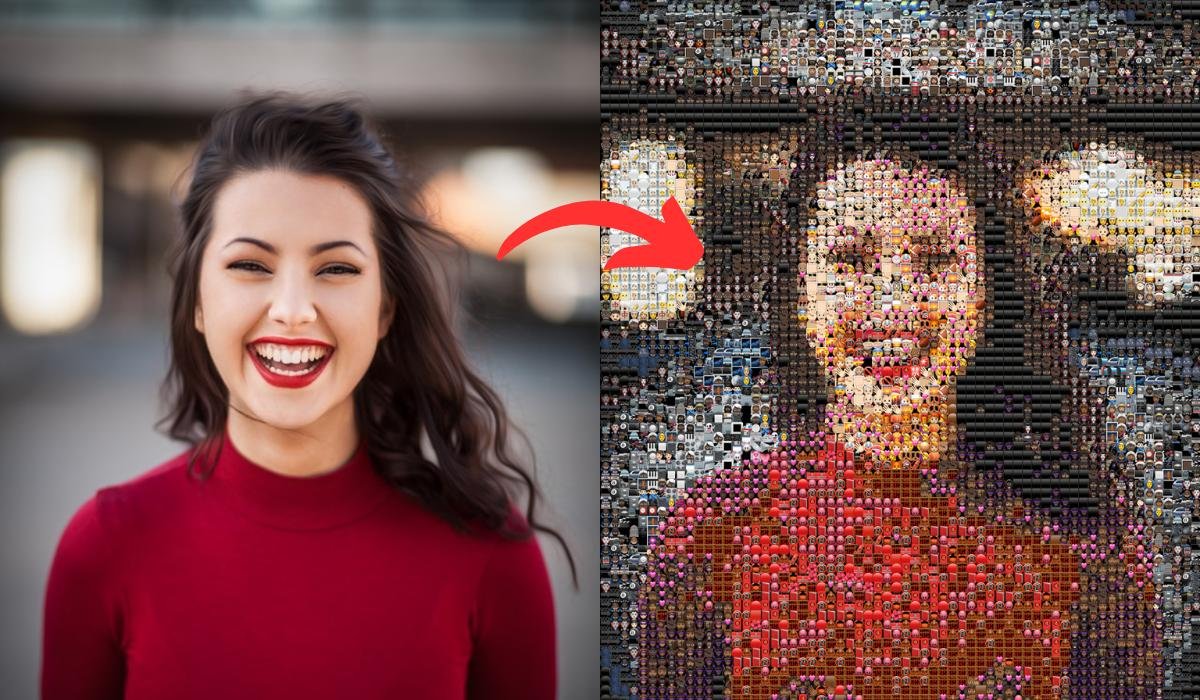
Want to turn any photo into an emoji? With modern AI image tools, you can transform a regular selfie, pet photo, cartoon, or favorite picture into a fun emoji-style image in just a few steps.
An AI emoji converter can analyze a photo and recreate its main features in an emoji-inspired style. Depending on the tool, you may be able to create cute, funny, realistic, cartoon, or expressive emoji versions of your images.
In this guide, we’ll explain how to turn a photo into an emoji, what AI emoji converters do, how to create better results, and some useful tips for sharing your custom emojis.
What Is an AI Emoji Converter?
An AI emoji converter is an image-generation or image-editing tool that transforms an existing photo into an emoji-style design.
Instead of manually drawing an emoji, AI can analyze elements such as:
- Facial expressions
- Hair and hairstyle
- Clothing
- Colors
- Facial features
- Pets and animals
- Background elements
The tool then creates a new image inspired by the original photo.
How to Turn Any Photo Into an Emoji
The process is usually simple and doesn’t require professional editing skills.
Step 1: Choose a Photo
Start with a clear photo from your phone gallery.
A front-facing selfie is usually a good choice because the face is easier for an AI tool to recognize.
You can also use:
- Pet photos
- Family pictures
- Cartoon characters
- Food photos
- Travel pictures
- Objects
- Avatars
Step 2: Open an AI Emoji Converter
Choose an AI image tool that supports photo-to-image or image-to-emoji transformations.
Upload your selected photo and follow the tool’s instructions.
Step 3: Choose an Emoji Style
If the tool provides style options, select the look you want.
For example:
- Cute emoji
- 3D emoji
- Cartoon emoji
- Chibi style
- Funny emoji
- Sticker style
- Animated-style emoji
Step 4: Add a Prompt
Some AI tools allow you to describe the result you want.
For example:
“Turn this photo into a cute 3D emoji with a smiling expression, clean background, and bright colors.”
A specific prompt can help the AI understand your desired style.
Step 5: Generate the Emoji
Submit the photo and let the AI process it.
The result may take a few moments depending on the tool and image complexity.
Step 6: Save and Share
Once you’re happy with the result, save the generated image and use it as a profile picture, sticker, social media image, or chat graphic where supported.
Best AI Emoji Styles to Try
Different styles can produce completely different results.
3D Emoji
A 3D emoji style can give your photo a polished appearance with rounded features, smooth textures, and expressive facial details.
Cute Cartoon Emoji
This style works especially well for selfies and portraits.
The AI can exaggerate facial expressions while keeping the image playful.
Chibi Emoji
Chibi-style designs usually feature simplified facial features and an oversized head.
They can work well for profile pictures and social media stickers.
Funny Emoji
You can ask the AI to exaggerate an expression such as laughing, surprised, confused, or excited.
Sticker Emoji
A sticker-style result can include a clean background or transparent-looking border, making the image easier to use in creative projects.
Turn a Selfie Into an Emoji
One of the most popular uses of an AI emoji maker is converting selfies into personalized emojis.
For better results, use a photo with:
- Good lighting
- A clear face
- Minimal blur
- A simple background
- Your face looking toward the camera
You can then experiment with different expressions.
Emoji Expression Ideas
Try creating versions such as:
- 😀 Happy
- 😂 Laughing
- 😍 Loving
- 😎 Cool
- 😮 Surprised
- 😢 Sad
- 😡 Angry
- 🤔 Thinking
- 🥳 Celebrating
- 😴 Sleepy
Creating several expressions can give you a complete personal emoji collection.
Turn Your Pet Photo Into an Emoji
AI emoji converters aren’t limited to people.
You can also experiment with photos of cats, dogs, birds, and other pets.
For example, a normal dog photo can be transformed into a cute cartoon emoji with a large head, expressive eyes, and a playful appearance.
Prompt Example
You could try:
“Transform this dog photo into a cute 3D emoji, keeping the dog’s original colors and facial expression.”
The more clearly you describe the desired style, the easier it can be for the AI to follow your idea.
How to Get Better AI Emoji Results
Use High-Quality Photos
A sharp image usually provides more useful information than a heavily blurred or compressed picture.
Keep the Main Subject Clear
If you are converting a selfie, make sure your face is clearly visible.
Describe the Style
Instead of simply asking for “an emoji,” describe the exact appearance you want.
For example:
“Create a cute 3D emoji version with a smiling expression, smooth details, bright lighting, and a simple background.”
Try Multiple Variations
AI-generated images can vary from one generation to another.
If the first result doesn’t look right, try changing the prompt or generating another version.
Can AI Create a Whole Emoji Pack?
Yes, you can create multiple emoji-style images based on the same person or character.
For example, you could make a set containing:
- Happy
- Sad
- Angry
- Laughing
- Surprised
- Confused
- Excited
- Sleepy
- Love
- Cool
A consistent style prompt can help make the collection look more unified.
Photo to Emoji for Social Media
Custom emojis can be useful for social media content.
You can use your generated designs as:
- Profile images
- Social media stickers
- Reaction images
- Chat graphics
- YouTube thumbnails
- Blog illustrations
- Personal avatars
Always check the rules of the platform where you plan to upload or distribute the generated image.
Is an AI Emoji Converter Free?
Some AI image tools offer free generations or limited features, while others may require a subscription or credits.
The available options can change over time.
Before uploading a personal photo, check the tool’s pricing, privacy policy, and terms of use.
Are AI-Generated Emojis Safe?
AI image tools can be useful, but you should think about privacy before uploading personal photos.
Avoid Sensitive Photos
Don’t upload images containing confidential documents, private information, or other material you don’t want processed by a third-party service.
Check Privacy Policies
Before using an unfamiliar AI service, review how it handles uploaded images and whether images may be stored or used for other purposes.
Use Trusted Tools
Choose established services with clear information about their privacy and data practices.
Frequently Asked Questions
Can I turn any photo into an emoji?
Most AI image converters can work with many types of photos, although results can vary depending on image quality, subject, and the capabilities of the tool.
Can I turn a selfie into an emoji?
Yes. Selfies are one of the easiest types of images to use for creating personalized emoji-style images.
Can I turn my pet into an emoji?
Yes. AI image tools can also transform pet photos into cartoon, 3D, or sticker-style designs.
Do I need editing skills?
No. Most AI-powered tools are designed to simplify the process, so you generally don’t need professional photo-editing experience.
Can I create different emoji expressions?
Yes. You can create multiple versions with expressions such as happy, sad, angry, laughing, surprised, or excited.
Can I use AI emojis as stickers?
Depending on the tool and output format, you may be able to use generated images as personal stickers or social media graphics. Check the relevant platform’s requirements before publishing them.
Final Thoughts
The turn any photo into an emoji AI trick is a fun way to transform ordinary images into personalized digital artwork. Whether you want to convert a selfie, pet photo, or favorite picture, an AI emoji converter can create interesting results without requiring advanced editing skills.
For the best results, start with a clear photo, choose a specific emoji style, describe the expression you want, and experiment with different prompts. Always consider privacy when uploading personal images to third-party AI services.
Disclaimer
This article is for informational purposes only. AI tools, features, pricing, and availability can change. Always review the privacy policy and terms of any AI service before uploading personal photos.